Before & After
How do you show a patient their veneer result before doing the work?
Gabriel Gimenez · Published on September 19, 2026
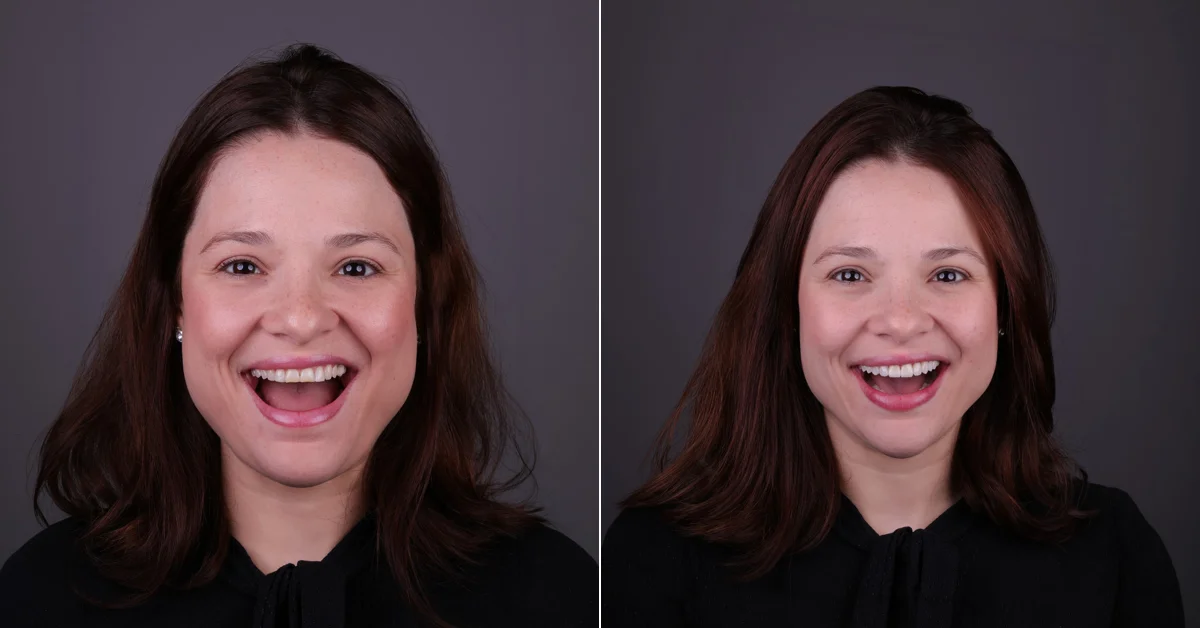
The fastest way to show a patient their veneer result before doing the work is an AI simulation made from a photo of them. In dentraw LAB, Preview does this in seconds: you photograph the smile, upload the photo and get a realistic preview of how the smile can look, still at the first appointment, with no lab, no wax-up and no extra cost per attempt.
This changes the conversation completely. Instead of describing the treatment with words and hoping the patient can picture it, you put an image of their own face with the planned smile in front of them. The decision stops being abstract and becomes concrete.
I have seen this firsthand in conversations with dentists who use dentraw LAB every day: those who present the simulation together with the proposal report closing cases that used to end in "let me think about it". When the patient sees their own smile transformed, the question shifts from "is it worth it?" to "when do we start?".
Why show the preview before doing the veneers?
Veneers are a high-value, high-expectation treatment. The patient is buying something they cannot see beforehand, and that is exactly where most proposals die. The simulation solves three problems at once:
- Aligned expectations: the patient sees a reference for shape, size and proportion before any preparation.
- Faster decision: the image turns the treatment into something tangible, and the "let me think about it" objection shrinks.
- Less rework: when patient and dentist agree on the desired look from the start, the chance of change requests at the end drops.
One definition that sums it up: an AI veneer simulation is a visual communication tool that brings patient and dentist to the same imagined result before any clinical procedure.
How does AI veneer simulation work in Preview?
The Preview workflow in dentraw LAB was designed to fit inside a normal appointment:
- Take a photo of the patient's smile with your phone, with good light and a frontal frame.
- Upload the photo to Preview and describe the goal: veneers, desired shape, whitening shade.
- Within seconds the AI returns the new smile simulation on the patient's real photo.
- Show the preview on screen, compare it with the original photo and present the treatment proposal.
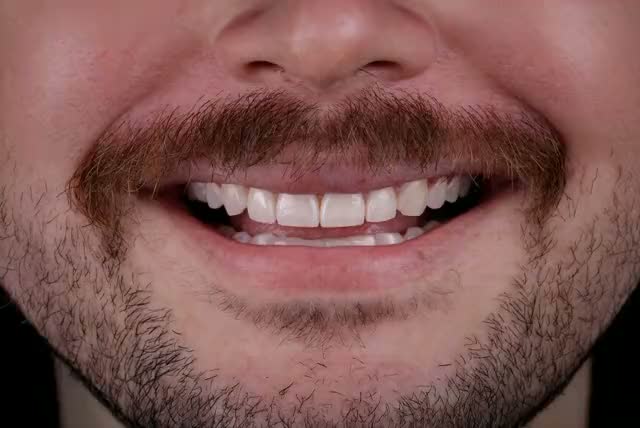
No number here replaces the technical plan: the preview is a visual reference. The diagnostic wax-up, the mock-up and the clinical evaluation remain the foundation of the indication.
What is the difference between AI simulation, wax-up and mock-up?
| Resource | Speed | Cost | Main function |
|---|---|---|---|
| AI simulation (Preview) | Seconds, in the chair | Low per image | Communication and decision |
| Diagnostic wax-up | Days, at the lab | Higher, with lab fees | Technical planning |
| In-mouth mock-up | Minutes, with provisional resin | Material and chair time | Aesthetic validation in the mouth |
The best approach is not to pick one, but to use all three in sequence: AI opens the conversation and helps the patient decide, the wax-up translates the decision into a plan, and the mock-up validates it in the mouth before preparation. Dentists who use the simulation as the first step spend less time and material on mock-ups for patients who were still unsure.
What should you say when presenting the simulation?
How you present it matters as much as the image. What I recommend, after many conversations with partner dentists:
- Present the simulation as a visual reference, never as a guarantee of outcome. Clinical results depend on exams, biotype and technique.
- Show the before and the preview side by side and ask: "is this roughly what you had in mind?". That turns the patient into a participant in the planning.
- Tie it to the next step: "if you like this reference, the next step is to confirm it with exams and a wax-up".
- Check the current rules of your regional dental board or council about advertising and the use of illustrative images before using simulations in marketing material.
How much does it cost to simulate a veneer result?
On dentraw LAB you start with a free trial, and the pricing logic is simple: a subscription for daily use, pay-as-you-go credits for occasional simulations. Plans are monthly, quarterly and annual, and individual credits start at R$3.90 per image, R$6.90 per video or R$11.90 for a 24-hour pass. I broke it all down in How much does dentraw LAB cost?.
Compared to the cost of a lab wax-up just so the patient can "see if they like it", an AI simulation costs a small fraction and can be reused: the same preview works as a presentation piece, a record of expectation alignment and, with the patient's authorization, marketing material.
FAQ
Do I need special equipment to simulate veneers? No. A phone photo with good lighting is enough for Preview to generate the simulation. The better the smile framing, the better the preview, so it is worth following good dental photography practices.
Does the AI simulation replace a diagnostic wax-up? No. The simulation is a communication and expectation-alignment tool, not a technical plan. The wax-up, the mock-up and the exams remain the foundation of the clinical indication.
Can I show the simulation at the first appointment? Yes, that is the best moment. You take the photo, generate the preview in seconds and present it together with the treatment proposal, while the patient is still in the chair.
Will the patient expect the result to look identical to the simulation? That is why the presentation must make clear that the preview is illustrative, a reference for shape and proportion, not a promise of outcome. Explain that the real plan depends on exams and the biological limits of each case.
How much does a simulation cost on dentraw LAB? You can start with a free trial. After that there are monthly, quarterly and annual plans, plus pay-as-you-go credits starting at R$3.90 per image, for occasional use.
Does it work for treatments other than veneers? Yes. The same logic applies to whitening, diastema closure, crown lengthening and smile harmonization in general.
Related articles
- How to simulate a smile with AI before charging the patient?
- What are porcelain veneers and who are they for?
- How much does a full smile with veneers cost in 2026?
If you want to show your next patient the smile you are planning, before they decide, start now with a free trial of dentraw LAB Preview.
Frequently asked questions
Do I need special equipment to simulate veneers?
No. A phone photo with good lighting is enough for Preview to generate the simulation. The better the smile framing, the better the preview, so it is worth following good dental photography practices.
Does the AI simulation replace a diagnostic wax-up?
No. The simulation is a communication and expectation-alignment tool, not a technical plan. The wax-up, the mock-up and the exams remain the foundation of the clinical indication.
Can I show the simulation at the first appointment?
Yes, that is the best moment. You take the photo, generate the preview in seconds and present it together with the treatment proposal, while the patient is still in the chair.
Will the patient expect the result to look identical to the simulation?
That is why the presentation must make clear that the preview is illustrative, a reference for shape and proportion, not a promise of outcome. Explain that the real plan depends on exams and the biological limits of each case.
How much does a simulation cost on dentraw LAB?
You can start with a free trial. After that there are monthly, quarterly and annual plans, plus pay-as-you-go credits starting at R$3.90 per image, for occasional use.
Does it work for treatments other than veneers?
Yes. The same logic applies to whitening, diastema closure, crown lengthening and smile harmonization in general.