AI for Dentists
How do you generate smile transformation videos with AI?
Gabriel Gimenez · Published on September 19, 2026
To generate a smile transformation video with AI, you need a patient photo and dentraw LAB's Live tool: you upload the photo, the AI simulates the treated smile and renders a video showing the transition from before to after, all in a few minutes with no editing software. The video comes out ready to post on Instagram, send over WhatsApp, or present chairside.
Pricing is per generation: R$6.90 per single video, with a 24-hour pass option at R$11.90 for producing a full case's content in one day. Clients outside Brazil are billed in dollars, converted from the Brazilian real price table. The pricing logic at dentraw LAB is simple: frequent use pays off with a subscription, occasional use pays off with single credits. I break down every option in the article on how much dentraw LAB costs.
Below I walk through the exact process I use when recording demos for dentists, the photo details that matter, and where this video performs best.
What is the step-by-step process in Live?
The full flow, from photo to published video, looks like this:
- Photograph the patient's smile in the office, facing the camera, with good lighting. A phone camera is enough.
- Open dentraw LAB and go to the Live tool.
- Upload the photo and describe the goal of the transformation, such as whitening, closing a diastema, or visual alignment.
- Wait for the render. The AI builds the treated-smile simulation and animates the transition from before to after.
- Download the video and publish it: reels, stories, the office WhatsApp, or the waiting-room screen.
What kind of photo produces the best video?
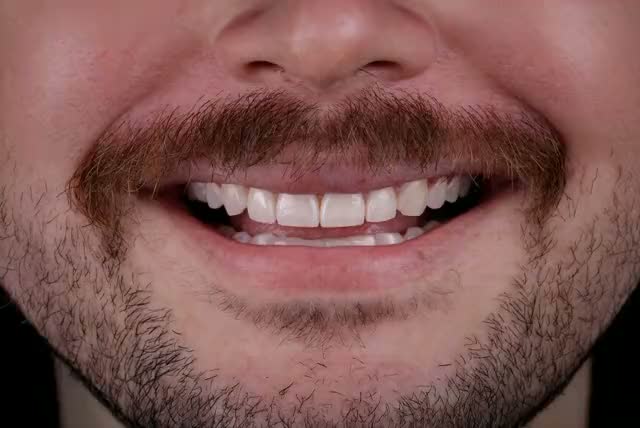
Video quality starts with the photo. From my own testing of Live on real cases, three details completely change the outcome:
| Detail | What to do | What to avoid |
|---|---|---|
| Framing | Frontal shot, full face visible, smile centered | Side angle or cropping the mouth |
| Lighting | Natural light or ring light, soft shadows | Backlighting and dark rooms |
| Expression | Natural smile showing teeth | Closed mouth or forced smile |
A weak photo won't block the generation, but it hurts the realism of the transition. Spending two extra minutes on the capture protects the credibility of the before and after.
Where does a transformation video perform best?
Carlos and I have seen three uses repeat among the dentists who get the most out of dentraw LAB:
- Reels and TikTok: the before-to-after transition format holds attention in the first seconds, which is exactly where the algorithm decides whether to distribute the video. I cover this in depth in the article on before-and-after reels for dentists.
- Treatment plan presentation: showing the animated simulation chairside helps the patient picture themselves in the result and cuts down the "let me think about it."
- WhatsApp follow-up: after the evaluation visit, the video goes out with the treatment plan and keeps the desire alive until the decision.
Can you use an AI video with a real patient's photo?
Yes, but with consent. Real patient before-and-after content is sensitive communication in dentistry: check the current regulations from your dental board or local authority on advertising, and keep a signed image-use consent form on file. What I recommend in practice is separating two content types: simulations built from models or authorized cases for marketing, and individual simulations used only inside the office, in the conversation with that specific patient.
One important note: the video is a communication and motivation piece, not a promise of clinical results. When presenting it, make clear it's an aesthetic simulation and that the treatment plan depends on clinical evaluation.
How much does it cost to generate these videos on dentraw LAB?
A single video in Live costs R$6.90. If you're producing a full case's content in one day, the 24-hour pass at R$11.90 unlocks the whole platform for that window. For dentists generating videos every week, subscription plans starting at R$333 per month bring the cost per generation down. International clients are billed in dollars at the converted values. The full comparison is in the article how much dentraw LAB costs.
The 3-day trial, with a card on file, unlocks Live along with the other tools. My suggestion: start the trial with a real case in hand and generate your first video within the first hour.
FAQ
Do I need video editing skills to use Live? No. Live takes the photo and generates the transformation video automatically. You don't need editing software or technical knowledge.
How much does it cost to generate a transformation video on dentraw LAB? A single video costs R$6.90 (or the dollar equivalent for international clients). There's also a 24-hour pass and subscription plans, which work out cheaper for frequent use.
Can I use the video on Instagram and WhatsApp? Yes. The video is yours to publish anywhere: feed, reels, stories, WhatsApp, or chairside presentations. For patient photos, get signed image-use consent according to the regulations in force.
Does an AI-generated video replace clinical planning? No. The video is a communication and motivation piece. Treatment planning remains clinical, with an exam, impressions, or scanning.
What kind of photo works best in Live? A frontal smile photo with good lighting and the full face visible. Dark, tilted, or distant photos reduce the quality of the transformation.
If you want to see your next patient's smile come to life before the treatment plan is even signed, start your free 3-day trial of dentraw LAB now.
Related articles
Frequently asked questions
Do I need video editing skills to use Live?
No. Live takes the photo and generates the transformation video automatically. You don't need editing software or technical knowledge.
How much does it cost to generate a transformation video on dentraw LAB?
A single video costs R$6.90 (or the dollar equivalent for international clients). There's also a 24-hour pass and subscription plans, which work out cheaper for frequent use.
Can I use the video on Instagram and WhatsApp?
Yes. The video is yours to publish anywhere: feed, reels, stories, WhatsApp, or chairside presentations. For patient photos, get signed image-use consent according to the regulations in force.
Does an AI-generated video replace clinical planning?
No. The video is a communication and motivation piece. Treatment planning remains clinical, with an exam, impressions, or scanning.
What kind of photo works best in Live?
A frontal smile photo with good lighting and the full face visible. Dark, tilted, or distant photos reduce the quality of the transformation.