Dental Photography
How do you upscale a dental photo without losing quality?
Gabriel Gimenez · Published on September 19, 2026
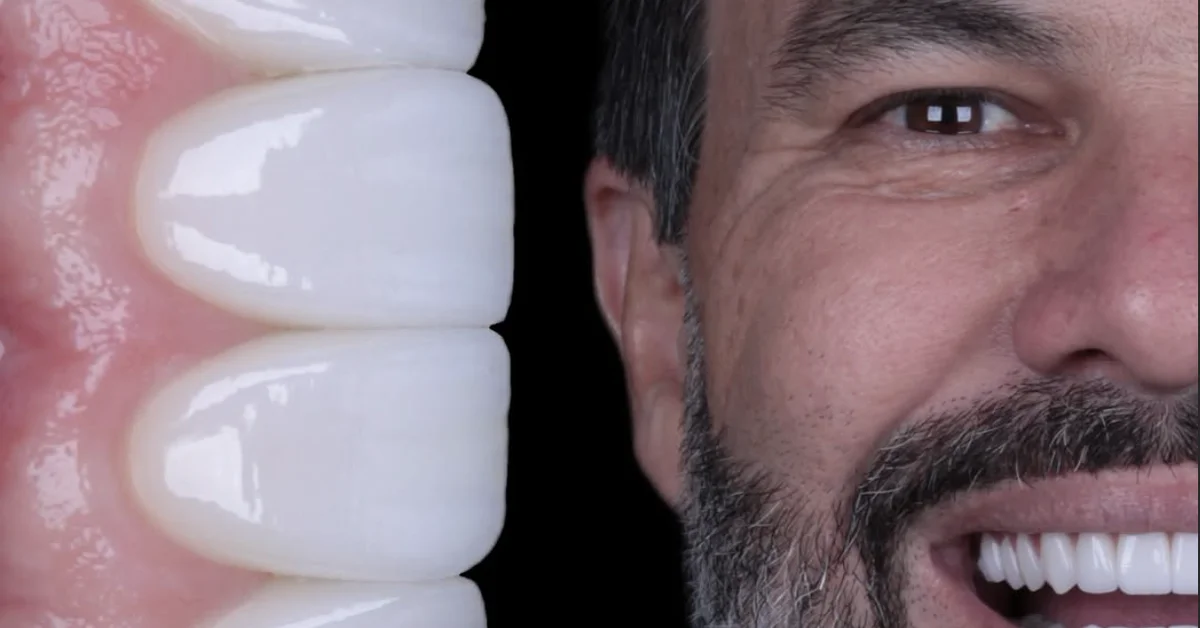
Upscaling a dental photo without losing quality is done with AI trained on clinical images. Unlike stretching an image in an editor, which only duplicates pixels and blurs everything, AI rebuilds the missing detail: prep margins, enamel texture, the reflection on the gingiva. The result is a higher resolution photo that still looks like a photo, not a painting.
The practical path is this: take the best photo you can with whatever gear you have, even a regular phone, then run AI upscaling in a tool built for dentistry. dentraw LAB has exactly that tool: it turns a mediocre phone photo into an image that looks like professional portfolio material, in seconds, without you needing to know anything about editing.
Below I explain what happens inside an upscale, how far you can push it, and the step by step I recommend for dentists whose phone gallery is full of underused clinical photos.
What happens when you enlarge a photo without AI?
Enlarging an image with traditional methods is interpolation: the software takes existing pixels and invents the ones in between by averaging the neighbors. The tooth becomes a blurry mass, the gingival margin loses definition, and any zoom reveals jagged edges.
AI upscaling is a different process: the model was trained on millions of low and high resolution image pairs, so it learned what a sharp tooth should look like and rebuilds missing detail instead of just interpolating.
| Method | What it does | Typical result on a dental photo |
|---|---|---|
| Resizing in an editor | Duplicates pixels by averaging | Blurry edges, enamel texture lost |
| Sharpening filter | Boosts edge contrast | Artificial halos, grainy look |
| Generic AI upscaler | Rebuilds based on everyday photos | Great skin and landscapes, weird tooth texture |
| Dental AI upscaler | Rebuilds based on clinical photos | Enamel, gingiva, and prep preserved |
How much can you enlarge a dental photo?
In my day to day testing user photos at dentraw LAB every week, the healthy limit sits between 2x and 4x. Within that range, the reconstruction is faithful enough for Instagram posts, case presentations, and visual treatment plans.
Beyond 4x, any tool starts inventing detail that never existed. For social media that might go unnoticed, but in clinical documentation it is a problem, because the image stops being a faithful record.
Three factors decide the final result:
- Focus of the original photo. A sharp photo, even a small one, upscales beautifully. A shaky photo has no upscale that saves it.
- Lighting. A reasonably lit photo, even at low resolution, recovers sharpness. A dark photo carries noise that the AI amplifies along with the detail.
- Compression. A photo forwarded through WhatsApp several times arrives destroyed by compression. Always use the original camera file.
What is the step by step to upscale a dental photo with AI?
The workflow I recommend, and the one I use myself when building demo material for dentraw LAB:
- Pick the original file. Grab the photo straight from the phone gallery or the camera card, never a screenshot or a WhatsApp forward.
- Crop first if needed. Cropping before upscaling makes the AI work only on the area that matters, like the smile or the treated tooth.
- Run a 2x upscale. Evaluate the result. If the photo is going to a big screen or print, try 4x and compare.
- Fix light and color if needed. If the original came out yellowish from the operatory lighting, image enhancement solves it before or after the upscale.
- Keep the original. The enlarged version is for publishing and presentation. The clinical record remains the original photo.
Inside dentraw LAB, steps 3 and 4 happen in the same place: you upload the photo, run the upscale, and if you want, apply light and color enhancement right after, without exporting anything. Each image enhancement costs the equivalent of a single image credit, and the platform pricing logic is detailed in the article how much does dentraw LAB cost.
When does upscaling not help?
I learned this the annoying way. Early on at dentraw LAB, Carlos Herton and I tested the upscaler on a batch of photos dentists sent us, and some of them simply could not be fixed: photos taken while the phone was moving, flash blown out on the enamel, the dentist's own shadow covering half the tooth. The AI amplified the defect along with the detail.
The rule I keep is: upscaling recovers resolution, it does not recover capture mistakes. If the photo is focused and lit, upscale away. If it is blurry or blown out, retaking it is faster, and a recent phone with diffused flash already does the job, as I show in the article about professional dental photos with a phone.
Is upscaling for clinical documentation or just marketing?
Both, with one important caveat. For marketing, social media, and presenting the case to the patient, the enlarged image is the ideal format, because phone screens and projectors punish low resolution photos.
For patient records and documentation with legal weight, the original photo is the valid record. Upscaling rebuilds detail by inference, and that should not replace the raw file. I recommend keeping both versions and checking the current rules of your local dental board on patient photography, including consent for using images in promotional material.
FAQ
Does AI upscaling make the photo look artificial? It depends on the tool. Generic upscalers tend to invent texture that was never there. Tools trained on dental photography, like the one in dentraw LAB, preserve tooth anatomy and only rebuild sharpness.
How many times can I enlarge a dental photo? In practice, 2x to 4x enlargements deliver the best balance between size and natural look. Beyond that, any tool starts inventing too much detail.
Can a photo taken with an old phone still be saved? In most cases, yes. If the photo is in focus and well lit, AI upscaling recovers enough sharpness for publishing and case presentation. A blurry or dark photo has a limit to what can be recovered.
Can I use an upscaled photo in clinical records? Upscaling improves presentation, but the original image should be kept in the patient record. For records and legal purposes, check the current rules of your local dental board regarding photographic documentation.
What is the difference between upscaling and photo enhancement? Upscaling increases image resolution. Enhancement fixes light, color, and sharpness without changing the size. dentraw LAB has both tools, and they can be combined.
If your gallery is full of good clinical photos that are just too small to publish, try the dentraw LAB upscaler now: start with 3 free days and see what the AI does with a real photo of yours.
Related articles
Frequently asked questions
Does AI upscaling make the photo look artificial?
It depends on the tool. Generic upscalers tend to invent texture that was never there. Tools trained on dental photography, like the one in dentraw LAB, preserve tooth anatomy and only rebuild sharpness.
How many times can I enlarge a dental photo?
In practice, 2x to 4x enlargements deliver the best balance between size and natural look. Beyond that, any tool starts inventing too much detail.
Can a photo taken with an old phone still be saved?
In most cases, yes. If the photo is in focus and well lit, AI upscaling recovers enough sharpness for publishing and case presentation. A blurry or dark photo has a limit to what can be recovered.
Can I use an upscaled photo in clinical records?
Upscaling improves presentation, but the original image should be kept in the patient record. For records and legal purposes, check the current rules of your local dental board regarding photographic documentation.
What is the difference between upscaling and photo enhancement?
Upscaling increases image resolution. Enhancement fixes light, color, and sharpness without changing the size. dentraw LAB has both tools, and they can be combined.